DSig Part 1: XML Digital Signature and WS-Security Integrity
•Robert Broeckelmann

This post was originally published as “DSig Part 1: XML Digital Signature and WS-Security Integrity” on the Levvel Blog.
This post is also published on the IyaSec blog.
This is the first in a three part series exploring the use of digital signatures in Web Services and APIs. Digital signatures are the primary mechanism in use today to address the Integrity and Non-Repudiation criteria for application security models described in previous blog posts on the Levvel Blog. We are going to start with the use of XML Digital Signatures in WS-Security. It’s important to understand this technology and use case before we move on to the use of digital signatures with JSON, JWTs, and OpenID Connect in APIs, which is the real focus of this series. The XML DSig specification is used to provide digital signature functionality to XML Documents. It is is used by numerous other specs such as WS-Security and SAML2. This post will describe how digital signatures work with an X509 private/public key pair. Understanding the basic idea and understanding how something like this actually works under the covers are two different things. Having a deep understanding of the underlying mechanics makes troubleshooting problems relatively straightforward.
As with so many aspects of modern information security (at least the kind that I am advocating), digital signatures on XML documents have an industry standard. This is the XML Digital Signature specification. If you are really interested in this topic, I recommend reading this spec.
The XML Digital Signature spec has evolved over time. The original can be found here; in 2008, a second edition of the spec was created to address signatures for the XML v1.1 specification. According to the second edition of the spec, “This Second Edition of XML Signature Syntax and Processing adds Canonical XML 1.1 as a required canonicalization algorithm and recommends its use for inclusive canonicalization. This version of Canonical XML enables use of xml:id and xml:base Recommendations with XML Signature and also enables other possible future attributes in the XML namespace. Additional minor changes, including the incorporation of known errata, are documented in Changes in XML Signature Syntax and Processing (Second Edition).” If you are using an XML v1.0 document — most still are in the real world — this doesn’t really change anything. If an XML v1.1 document is being used, then some minor details do change that for the most part would be abstracted away by the library generating the digital signature. The exact changes are described here. In April, 2013, the W3C released XML Signature 1.1 that expanded the set of supported cryptographic algorithms (including Elliptic Curve DSA) and additional hash algorithms. The exact details of updates can be found here. In July, 2015, the latest draft (Working Group Note) from the W3C for XML Signature 2.0 was released. This version of the spec introducing a new Reference processing model that is not backwards compatible with 1.x of the XML Digital Signature specification. Though, a Compatibility Mode exists that allows 1.x style processing to work were needed. The example I provide in this blog post is based on the original XML Digital Signature specification.
What Benefit Does a Digital Signature Provide?
An incoming message that has a digital signature attached has the following benefits over a message that does not have a digital signature:
- Know that the holder of the private key used in the digital signature generation is the one who sent the message(of course, this assumes that the private key has not been compromised). This can be used as a form of authentication.
- Guarantee that the message that has arrived has not been altered in any way (ie, it has not been tampered with).
- Non-repudiation or the idea that the sender cannot challenge the validity of the message or its origin.
Note, digital signatures do not address message encryption. Stated another way, XML Digital Signature does not address XML document encryption. SSL/TLS , XML Encryption, or another encryption mechanism is needed to address this aspect of security.
Who are the Actors?
In the most basic scenario, there are two actors that are involved: Message Sender and Message Receiver.
If a Web Service is introduced that uses a synchronous request-respond Message Exchange Pattern, the two actors become: Service Consumer and Service Provider.
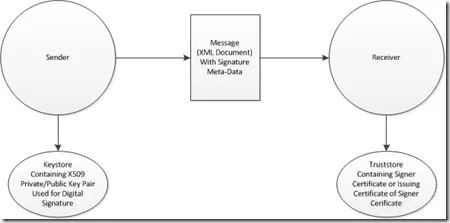
Message Sender
The Message Sender generates a message with a Digital Signature and sends it to the Message Receiver.
Message Receiver
The Message Receiver receives a message that contains a digital signature and validates the digital signature. Once the signature is validated, the actor may take appropriate steps to process the message with the assurances described in the “What Assurances Does a Digital Signature Provide” Section above.
Service Consumer
The Service Consumer creates a request message that contains a Digital Signature and receives a response that potentially contains a Digital Signature. It isn’t strictly required that the response have a Digital Signature. For that matter, it isn’t strictly required that the request have a Digital Signature if the benefits of one are not needed.
We are ultimately building up to the use of XML Digital Signature in WS-Security; however, the spec can be used on any properly valid XML document. So, where we use the term message in this tutorial, we are simply referring to any valid XML document.
Service Provider
The Service Provider receives a request message that contains a Digital Signature, validates the signature, performs processing, generates a response message, adds a Digital Signature to the response message, and sends the response message to the Service Consumer. If the response doesn’t need a digital signature, once again, it doesn’t have to be added.
How it Works
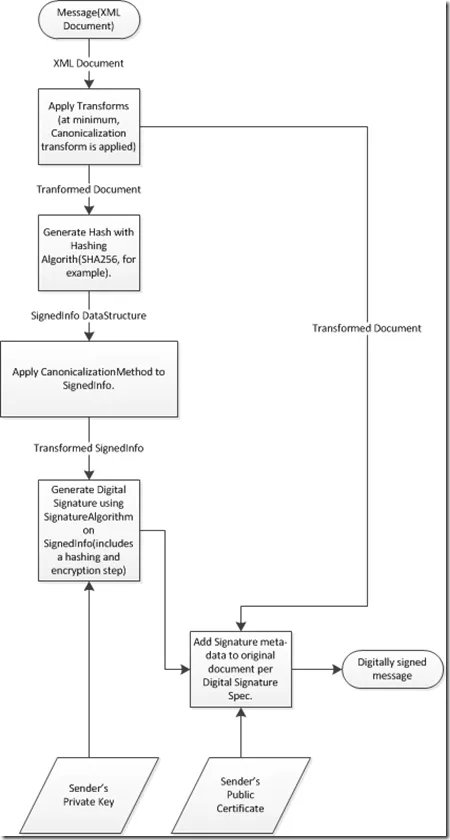
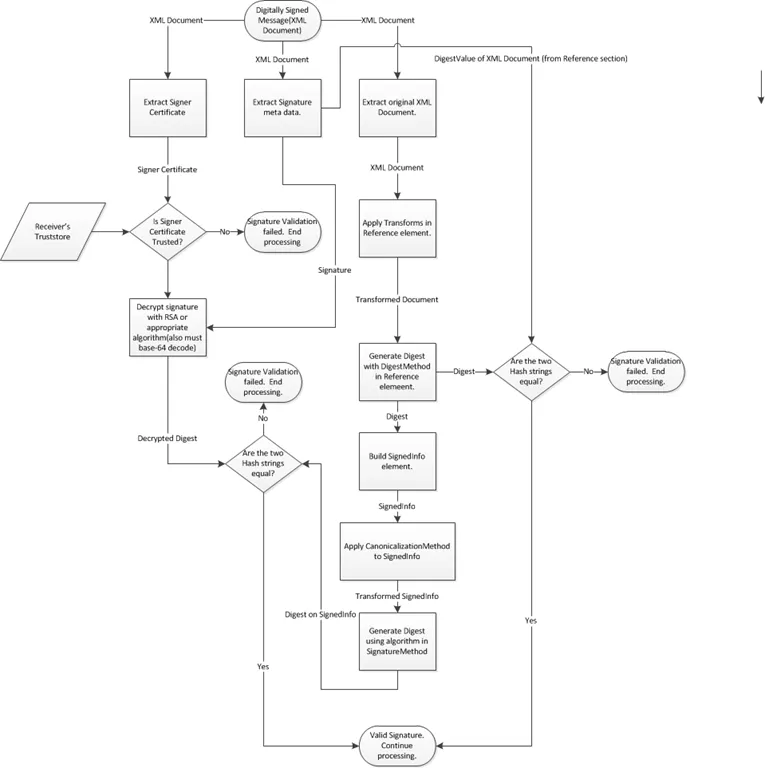
Rather than writing out all these details in words, I decided to put together flow charts showing what happens during signature generation and signature validation.
Note: I am assuming that an enveloped digital signature is being used (ie, the
Digital Signature Generation
The following workflow describes how the Message Sender’s run-time generates a digital signature on a message.
Digital Signature Validation
The following workflow describes how the Message Receiver’s runtime validates a Digital Signature.
Some additional points:
- The Message Receiver must check its local truststore to ensure that only valid messages from trusted senders are validated. Otherwise, any Sender that generates a correct signature regardless of what signer certificate was used will be allowed.
- The public signer certificate should be embedded in the message. This will allow the Message Receiver to work with messages from multiple senders easily.
- Put Issuing Certificates in the Truststore instead of individual signer certificates. An additional Subject DN check or other check will be needed to ensure only desired signer certificates are accepted.
- Use of a Digital Signature is usually accompanied by a Timestamp.
- The Message Receiver will generally dictate whether a Digital Signature is required. But, this is not always the case.
- The Digital Signature validation configuration of the Message Receiver side will generally be configured to expect certain parameters that will be described in a WS-SecurityPolicy document or other SLA document between the Message Sender and Message Receiver.
An Example
The following XML Digital Signature is from the XML Digital Signature spec. This is called a detached signature because the signature is separate from the document that was signed; it is a little different than the enveloping method that was described above which WS-Security Integrity uses. This is the digital signature over the spec document in HTML4 format.
[s01] <Signature Id=”MyFirstSignature” xmlns=”http://www.w3.org/2000/09/xmldsig#">
[s02]
[s03] <CanonicalizationMethod Algorithm=”http://www.w3.org/2006/12/xml-c14n11"/>
[s04] <SignatureMethod Algorithm=”http://www.w3.org/2000/09/xmldsig#dsa-sha1"/>
[s05] <Reference URI=”http://www.w3.org/TR/2000/REC-xhtml1-20000126/">
[s06]
[s07] <Transform Algorithm=”http://www.w3.org/2006/12/xml-c14n11"/> [s08]
[s09] <DigestMethod Algorithm=”http://www.w3.org/2000/09/xmldsig#sha1"/>
[s10]
dGhpcyBpcyBub3QgYSBzaWduYXR1cmUK…/DigestValue> [s11]
[s12]
[s13]
…
[s14]
[s15a]
[s15b]
[s15c]
…
…… …
[s15d]
[s15e]
[s16]
[s17]
Notice, that we are dealing with a
The first child element of
The first child element of
The second element of the
The third element of the
The first child element of the
This example contains a single
The next child element of the
The
The next child element of the
The next child element of the
<soapenv:Envelope xmlns:ws=”http://ws.rcbj.com/“ xmlns:soapenv=”http://schemas.xmlsoap.org/soap/envelope/“>
9
</ws:sumResponse>
</soapenv:Body>
</soapenv:Envelope>
If we add a digital signature and timestamp using WS-Security to this response, the message will look something like:
<soapenv:Envelope xmlns:soapenv=”http://schemas.xmlsoap.org/soap/envelope/” xmlns:ws=”http://ws.rcbj.com/">
<wsse:Security
xmlns:wsse=”http://docs.oasis-open.org/wss/2004/01/oasis-200401-wss-wssecurity-secext-1.0.xsd” soapenv:mustUnderstand=”1”>
<wsu:Timestamp
xmlns:wsu=”http://docs.oasis-open.org/wss/2004/01/oasis-200401-wss-wssecurity-utility-1.0.xsd” wsu:Id=”Timestamp-c1414e29–208f-4e5a-b0b7-f4e84ce870b9”>
wsu:Created2012–12–31T23:50:43Z</wsu:Created>
wsu:Expires2012–12–31T23:55:43Z</wsu:Expires>
</wsu:Timestamp>
<wsse:BinarySecurityToken
xmlns:wsu=”http://docs.oasis-open.org/wss/2004/01/oasis-200401-wss-wssecurity-utility-1.0.xsd”
wsu:Id=”SecurityToken-49cac4a4-b108–49eb-af80–7226774dd3e4”
EncodingType=”http://docs.oasis-open.org/wss/2004/01/oasis-200401-wss-soap-message-security-1.0#Base64Binary”
ValueType=”http://docs.oasis-open.org/wss/2004/01/oasis-200401-wss-x509-token-profile-1.0#X509v3">
MIIDOjCCAqOgAwIBAgIEdOq6LjANBgkqhkiG9w0BAQUFADBxMQswCQYDVQQGEwJVUzELMAkGA1UECBMCT1IxETAPBgNVBAcTCFBvcnRsYW5kMR0wGwYDVQQKExRSQ0JKIENvbnN1bHRpbmcsIExMQzELMAkGA1UECxMCSVQxFjAUBgNVBAMTDUR1bW15RFNpZ0NlcnQwHhcNMTIxMjMxMjM0NDQ3WhcNMjIxMjI5MjM0NDQ3WjBxMQswCQYDVQQGEwJVUzELMAkGA1UECBMCT1IxETAPBgNVBAcTCFBvcnRsYW5kMR0wGwYDVQQKExRSQ0JKIENvbnN1bHRpbmcsIExMQzELMAkGA1UECxMCSVQxFjAUBgNVBAMTDUR1bW15RFNpZ0NlcnQwgZ8wDQYJKoZIhvcNAQEBBQADgY0AMIGJAoGBALd4DQWC6PtcA9NXzpBvcv9jfDXHBpr9k9DWSe5qI5N8HPZ+8ArAyRURz9+cEz7yWcjL7WY0KzLrBrx9Xwn0Ss2Y+xyPfvVKCxVTkPF5kSLfwIWl3oL1bAVyMNyV1aB4GL7tWAHEe8E7y6djKTP2EZwRyUWHHjyKycqDxKADaKWXAgMBAAGjgd4wgdswDAYDVR0TBAUwAwEB/zAdBgNVHQ4EFgQUx+xJOYF+4DagDezOpMX5lwcCsxEwgZ4GA1UdIwSBljCBk4AUx+xJOYF+4DagDezOpMX5lwcCsxGhdaRzMHExCzAJBgNVBAYTAlVTMQswCQYDVQQIEwJPUjERMA8GA1UEBxMIUG9ydGxhbmQxHTAbBgNVBAoTFFJDQkogQ29uc3VsdGluZywgTExDMQswCQYDVQQLEwJJVDEWMBQGA1UEAxMNRHVtbXlEU2lnQ2VydIIEdOq6LjALBgNVHQ8EBAMCArwwDQYJKoZIhvcNAQEFBQADgYEAnPAuf0VmKv8gIxmHbE5D6ljyAHXXVpah6JWonJelmsrXMrkQygudnOEWYI4VjbMFWJ0Oatnx1krYv3M8Xs25xviOTe+jjALLMiq6T/BBU7iz+/WN9UZPJnd12DwrLE5+bXMvdRHlwVkU1krnbuhaIyZl2qlcCsrOqCYRfEqXqe8=
</wsse:BinarySecurityToken>
<Signature xmlns=”http://www.w3.org/2000/09/xmldsig#">
<CanonicalizationMethod Algorithm=”http://www.w3.org/2001/10/xml-exc-c14n#"/>
<SignatureMethod Algorithm=”http://www.w3.org/2000/09/xmldsig#rsa-sha1"/>
<Reference URI=”#Timestamp-c1414e29–208f-4e5a-b0b7-f4e84ce870b9”>
<Transform Algorithm=”http://www.w3.org/2001/10/xml-exc-c14n#"/>
<DigestMethod Algorithm=”http://www.w3.org/2000/09/xmldsig#sha1"/>
<Reference URI=”#Body-c4080b95–9986–49bf-abd0–3634de9b2b26”>
<Transform Algorithm=”http://www.w3.org/2001/10/xml-exc-c14n#"/>
<DigestMethod Algorithm=”http://www.w3.org/2000/09/xmldsig#sha1"/>
<wsse:SecurityTokenReference xmlns=””>
<wsse:Reference URI=”#SecurityToken-49cac4a4-b108–49eb-af80–7226774dd3e4” ValueType=”http://docs.oasis-open.org/wss/2004/01/oasis-200401-wss-x509-token-profile-1.0#X509v3"/>
</wsse:SecurityTokenReference>
</wsse:Security>
</soapenv:Header>
<soapenv:Body
xmlns:wsu=”http://docs.oasis-open.org/wss/2004/01/oasis-200401-wss-wssecurity-utility-1.0.xsd” wsu:Id=”Body-c4080b95–9986–49bf-abd0–3634de9b2b26”>
ws:sumResponse
</ws:sumResponse>
</soapenv:Body>
</soapenv:Envelope>
The first thing to notice between the original SOAP Message and Message with the timestamp and digital signature added is the size increase. The original message is 317 bytes in length; the message with digital signature and timestamp is 4358 bytes in length. That is almost 14X larger. Of course, in the real world, SOAP responses for services doing real work will probably be longer than 317 bytes. Nevertheless, criticism surrounding WS-Security having bloated messages and overhead is not unfounded. Of course, any effective security solution that satisfies the same requirements will have similar characteristics.
WS-Security places all security meta-data in a SOAP Header called
<wsu:Timestamp wsu:Id=”.” xmlns:wsu=”.”>
wsu:Created2012–12–31T23:50:43Z</wsu:Created>
wsu:Expires2012–12–31T23:55:43Z</wsu:Expires>
</wsu:Timestamp>
The first child element of the
<wsse:BinarySecurityToken wsu:Id=”.” EncodingType=”.” xmlns:wsu=””>
MIIDOjCCAqOgAwIBAgIEdOq6L…
</wsse:BinarySecurityToken>
The next child element of the
The last child element of the
- There are now two
elements in element. Notice that one points at the message body of the SOAP Message and the other points at the timestamp that was described previously. - The other difference is the
element contains a that points at the element described above.
More Information
I have summarized the SOA & SOAP security-related references I used in this blog post here.
For additional information about Digital Signatures check out Demystifying WS-Security book (amazon link).
This article was originally published onMedium.